
Getting started with pstack: core concepts, setup and playbooks

In her September 21 post, Grok Bot developer Lauren Tan said she shipped 2,500 PRs (proposed code changes) to production the previous month. How did she do it?
Why Lauren built pstack
Lauren Tan (poteto) previously worked at Meta, Netflix and Cursor, and contributed to React Compiler.
pstack collects the agent skills she uses day to day: instructions and tools for investigating problems, bringing in other roles and showing that a task is complete.
In The Complete Guide to pstack Pt. 1, she describes herself as Grok Bot’s “gardener.”
As a team keeps shipping PRs, someone needs to watch for duplicate code, a growing number of lint suppressions (instructions that silence code-check warnings) and structures that become harder to maintain.
She wants to refactor, add lint rules and build automated checks alongside new features, so the project’s foundations can keep up with contributions.
Lauren treats verification skills as infrastructure. They give agents tools to launch an app, use its UI, read errors and check their own results.
With these tools, an agent can work through “change → verify → fix.”
People set the goals and acceptance criteria without having to take over every interaction.
This first article covers setup, poteto-mode and playbooks.
Then we’ll give the agent a first task: understand the project before changing code.
The next article will cover building a verification skill, operating an app and collecting evidence, with examples.
Install and configure pstack
To get started quickly, give the official repo link to an AI that can work with local files.
Have it check which coding agents you use before installing:
Read the official pstack repo: https://github.com/cursor/plugins/tree/main/pstack
Start with the README. Check which AI tools I use and which installation methods they support.
Install the skills and adapt them to the tool where needed.
Keep the full docs, playbooks, scripts, agent definitions and referenced files.
Do not copy only SKILL.md.
Configure roles for the models currently available. Report unsupported features; do not assume they work.
Confirm that the AI can find and use the skills.
For the first project task, explain how the project works without modifying its files.
Report the installation path, version, configuration and evidence of what actually ran.
I keep pstack’s shared skills in ~/.agents/skills and symlink them into ~/.claude/skills, so Codex and Claude Code can use the same files.
If you use Cursor or Grok Bot
In Cursor:
/add-plugin pstack
/setup-pstack
In Grok Bot, open Connect Apps, search for pstack, then add it.
Start with poteto-mode
poteto-mode is the main entry point. Describe your task, and it picks a playbook, lists the steps and uses the skills it needs.
A playbook sets the workflow, such as investigating first or reproducing a bug first.
A skill provides a method, such as using architect to plan the structure.
A principle guides decisions. For example, prove-it-works calls for actual evidence. Principles are stored as skills too.
You don’t need to memorize every skill. Explain what you want to understand, what must stay unchanged and what counts as done.
Let /poteto-mode arrange the workflow.
As you read its response, ask: Where did this conclusion come from? Which steps actually ran? If verification was skipped, why?
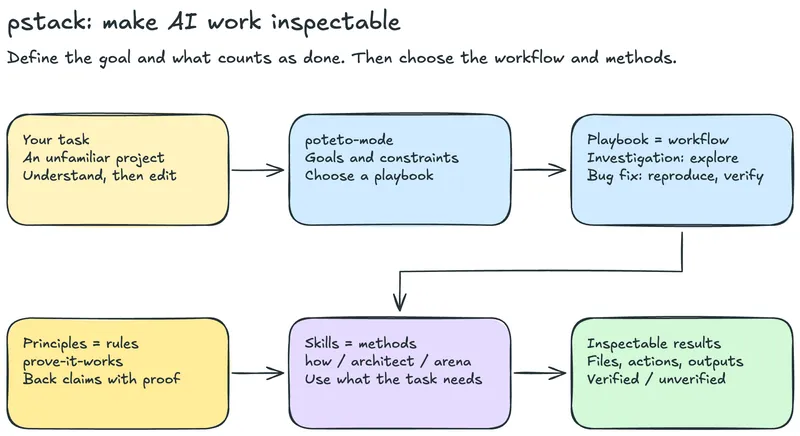
Task → poteto-mode → playbook → skills → inspectable results, with principles guiding decisions. Tap the diagram to enlarge it.
Your first task
Have the AI walk you through the project, then compare its explanation with the actual files. Try:
/poteto-mode I’m new to this project. Don’t change code yet.
Find the entry point, main modules, and commands for starting the app and running tests.
Map their relationships and cite the actual files. Mark anything you haven’t verified.
For a plugin, explain how it loads and how its configuration takes effect.
Six common playbooks
Investigation: explain existing behavior without changing code.
Bug fix: reproduce the problem, find the cause, fix it and check the result.
Feature: add or change behavior and confirm it meets the goal.
Refactoring: change the structure while preserving behavior.
Prototype: build a simple version to try out a design.
Perf issue: measure a baseline, then compare performance and resource use after the change.
Once you know the codebase, describe the outcome, constraints and what counts as done. Let the agent choose the playbook.
For example:
“Trace what happens after I click Log in, from UI to API. Cite the relevant files. Don’t change code yet.”
“Clicking Add to cart once creates two items. Reproduce the problem, fix it, then confirm that one click adds one item.”
“Add CSV export to the budgeting app, including date, category and amount. Check the exported content against test data.”
“The homepage loads slowly. Measure a baseline, find where the time goes, make a change and compare the results under the same conditions.”
You can look up the full playbooks when you need them.
Ask poteto-help when you get stuck
Stuck on installation, unsure which skill to use, or wondering how /poteto-mode works? Ask poteto-help:
/poteto-help I want to fix a reproducible bug with pstack. Should I use poteto-mode directly,
or choose another skill? Explain how to use it and give me a prompt I can adapt.
This asks about using pstack. It returns advice, a prompt and documentation sources.
When you’re ready to fix the bug, send the prepared prompt.
The next article will explain how to set up a verification skill and why agents need tools to operate an app and check results.
We’ll use examples to show how an agent can verify that its changes actually work.
For more content, follow me:
Instagram: @frede.richhh · Threads: @frede.richhh
YouTube: @frederichhh
Substack: @frederichhh