
The core of pstack: verification skills that let agents check their own work
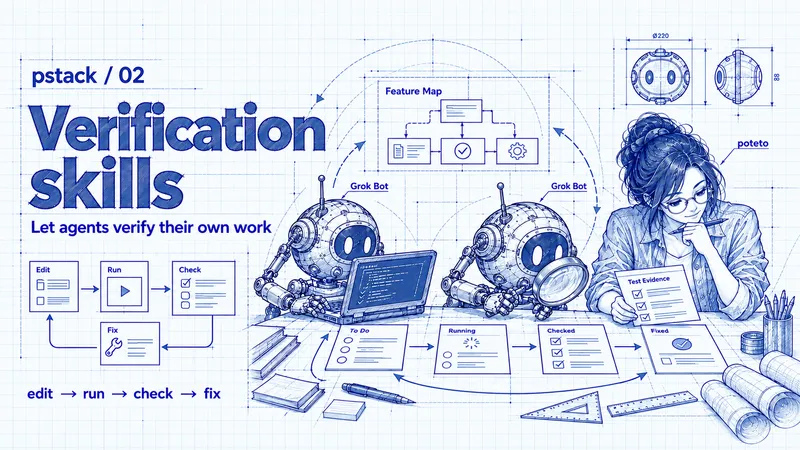
AI agents can already write plenty of code. But once they finish, someone still has to open the app, click through the flow, report the errors, and check whether the next fix actually works.
If every round comes back to you, you become the slowest part of the process. Running more agents only lengthens the queue of work waiting for you to check.
Lauren (@poteto) titles a section of pstack Part 1 “Verification is all you need.” Verification is a foundational capability for making agents useful, and it’s worth investing in as infrastructure.
People still need to set the goals and acceptance criteria: what counts as done, and what must keep working. The repetitive work of operating and checking the app can then shift to the agent.
Start with /create-verification-skill
After installing pstack, run /create-verification-skill in your project to build a verification skill for your app.
It helps you create tools for operating the app, along with a Feature Map. Together, they give the agent a way to go from changing code to checking the result.
We’ll use a hypothetical todo app throughout this article. The goal is simple: add “Buy milk,” reload the page, and confirm that the todo is still there.
You can start with this prompt:
/create-verification-skill
Start with adding a todo: enter and save "Buy milk". After reloading the page, exactly one todo with that text should remain.
Confirm your understanding of the requirement, then build the tools and Feature Map you need.
Run the flow once and report the expected result, actual result, and evidence. Mark any steps you could not run.
For this to work, the agent needs to be able to start the app, access a test account, and use separate test data. If a person still has to handle those steps every time, that’s where the process will stall.
What should the agent be able to do?
A verification skill works at runtime. The agent operates the app and checks logs, the UI, and data state instead of inferring the result from source code alone.
In the todo example, having save logic in the code doesn’t prove that clicking “Add” actually saves anything. The todo might appear right away, then disappear when the page reloads.
The agent needs to be able to complete this cycle:
Change the code → Use the app → Check the result → Find the problem → Fix and retest
If the check passes, report the evidence. If a step can’t be run, mark it as unverified. “It should work” is not a result.
Keep reusable operations in a CLI
To make that cycle repeatable, start with the control tools built by /create-verification-skill. A CLI can save operations like opening the app, adding a todo, and reading the result so later sessions can reuse them.
Without those tools, an agent may write a throwaway script every time, working out how to open the page, where to type, and which button to click. If the script isn’t kept, the next session has to recreate it.
You can package common operations as subcommands. For example:
todo-tool open
todo-tool add "Buy milk"
todo-tool reload
todo-tool list
todo-tool screenshot
These commands are made up to illustrate the idea; they aren’t built into pstack. /create-verification-skill helps build the actual tools and commands for your project.
The sequence is straightforward:
Open the app → Add a todo → Reload → Read the list → Save a screenshot
list lets the agent read the current todos. screenshot captures the UI for a person to review. After another fix, the agent can run the same sequence again.
In Part 1, Lauren recommends clear --help text, composable subcommands, and output that agents can easily read.
Errors should also explain what to do next. “Could not connect to the app; check that it is running” is more useful than “Failed.”
Use a Feature Map to understand the app
A CLI captures how to perform an operation, but a list of commands doesn’t show how the app fits together. Which list does a todo belong to? How do adding, editing, and completing a todo relate? Which flows might a change affect?
A Feature Map brings those features and paths together so people and agents share the same picture of how the software is structured. It starts with user-visible features and records their entry points, behavior, limitations, and control tools.
For our hypothetical todo app, the overall path looks like this:
Home → Choose a list → View todos → Add, edit, or complete a todo
The entry for “Add a todo” can then describe:
Entry point: Open a list and choose “Add todo.”
Action: Enter the text and click “Add.”
Expected behavior: One todo appears in the current list and remains after a reload.
Tools: The corresponding add, reload, and list commands.
Limits: This flow hasn’t been checked with other accounts or devices.
For a person, the map shows how features connect and helps reveal paths an agent may have missed. For an agent, it provides context the next session can reuse instead of exploring the app from scratch.
With the tools and map in place, the next step is to choose a path and check whether it meets the requirement.
Follow the Feature Map and check what “done” means
The earlier prompt already set a goal: the todo should remain after a reload. Now turn that goal into explicit acceptance criteria so the agent knows which results to check.
In pstack Part 2, Lauren points out that even capable models can be missing intent and context. Asking an agent to restate the problem and its proposed solution in its own words can surface misunderstandings early.
Does “successfully added” mean the todo appears immediately, or that it survives a reload? Those two readings call for different checks.
For this example, the acceptance criteria are:
Clicking “Add” once creates exactly one “Buy milk” todo.
That todo remains after reloading the page.
Other existing todos stay unchanged.
The agent finds the path in the Feature Map, uses the CLI to operate the app, and records the results against those criteria. A hypothetical failure report might look like this:
Action: Add "Buy milk"
After adding: One "Buy milk" todo appears
After reloading: That todo disappears
Expected: The todo remains after reloading
Result: Failed
That record gives the agent something concrete to investigate. Was the data never sent, never saved, or loaded incorrectly? Once it fixes the problem, it can run the same flow again.
A screenshot taken right after adding the todo doesn’t prove it was saved. The evidence needs to answer what the acceptance criteria ask.
Keep up with changes using /maintain-verification-skill
When the app’s features or UI change, the verification tools and Feature Map need to change with them. Use /maintain-verification-skill to check whether the existing operations still work.
For example, if the “Add todo” button moves to another page, an agent following the old instructions may not find it. Update the Feature Map and run the add flow again to confirm that the tools still work.
The same applies to new features. If the app now supports editing a todo, the agent needs to know where editing happens and how to confirm that the change was saved.
Recap: let the agent complete the inner loop
Verification lets an agent see the results of its changes, find problems, and keep correcting them. A person doesn’t need to step in every round, and the agent has evidence to guide its next step.
One way to think about this division of work is as an inner loop and an outer loop:
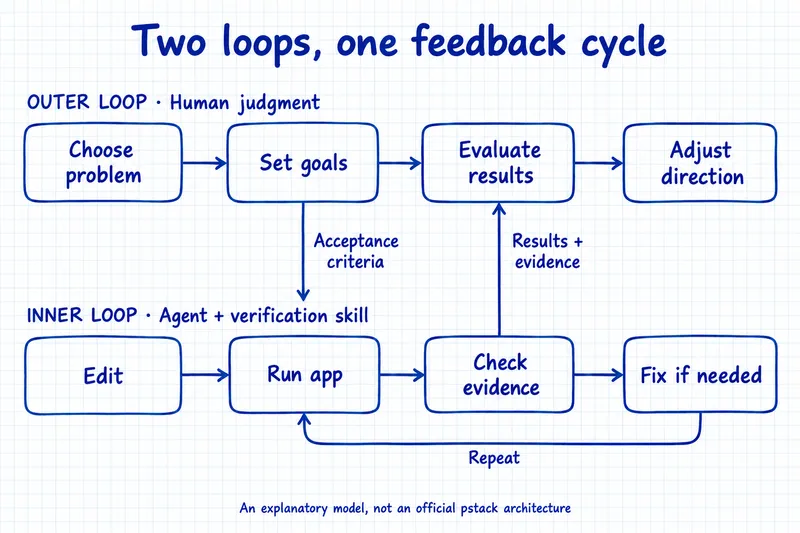
Inner loop: edit → run → check → fix
The verification skill supplies the tools and context for this cycle. When an agent can operate the app and read the results, it can work toward the acceptance criteria without stopping after every edit to wait for a person.
Outer loop: choose the problem → set goals → evaluate results → adjust direction
People can focus on what to build, why it matters, and whether the result is worth accepting. Agents can help research and compare options, while people keep judgment over direction and important tradeoffs.
Evidence from the inner loop feeds back into the outer loop. A feature may pass its checks, but does it feel right to use? After trying a prototype, is the original approach still worth pursuing? Verification gives those decisions something concrete to work from.
Next: how poteto uses pstack for research and development
In the next article, we’ll look at concrete uses Lauren (poteto) has shared: how she uses pstack to clarify problems, research and compare approaches, and then have agents implement and verify the results.
With verification in place, it becomes easier to see how those skills work together and what work an agent can carry forward on its own.
For more articles, follow me:
Instagram: @frede.richhh / Threads: @frede.richhh
YouTube: @frederichhh
Substack: @frederichhh